
:format(webp))
Welcome to SimplyNode Dashboard v2.0
We’ve upgraded! The new dashboard is live and ready to use. Everything works just as you’re used to — but now with exciting new features that give you more power and flexibility.
Unlimited Sub-Accounts – More Control, Less Hassle
In the previous version, you were limited to a single proxy profile. That worked fine, but it wasn’t ideal for users juggling multiple projects or clients.
Now, with Dashboard v2.0, you can create unlimited sub-accounts, each with its own balance and full control.
This is perfect for:
Separating usage by project or client
Managing team members or external partners
Tracking expenses with precision
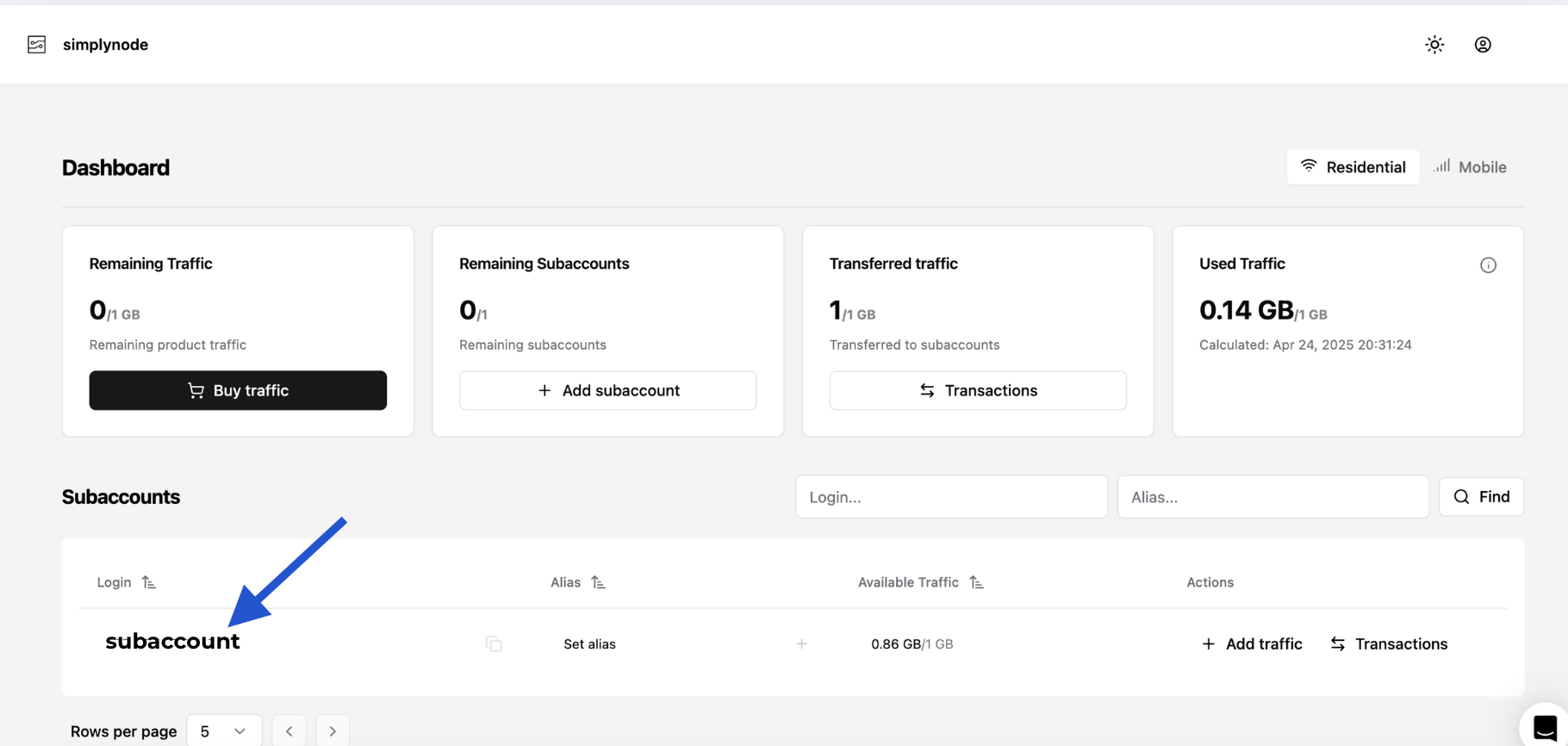
And here’s the best part:
You now have a main proxy balance, and from it, you can allocate custom balances to each sub-account. This way, you stay in full control of how your data is used across different teams or purposes.
Creating a sub-account takes just a few clicks. Go to the Sub-Accounts section, hit “Create Sub-Account”, give it a name, set a balance, and you’re ready to roll.
Using Proxies Made Simple – Sub-Account Proxy Settings
Accessing and configuring proxies for each sub-account is fast and easy. Just click on the sub-account name in your dashboard (as shown below), and the Proxy List Generator will open automatically.
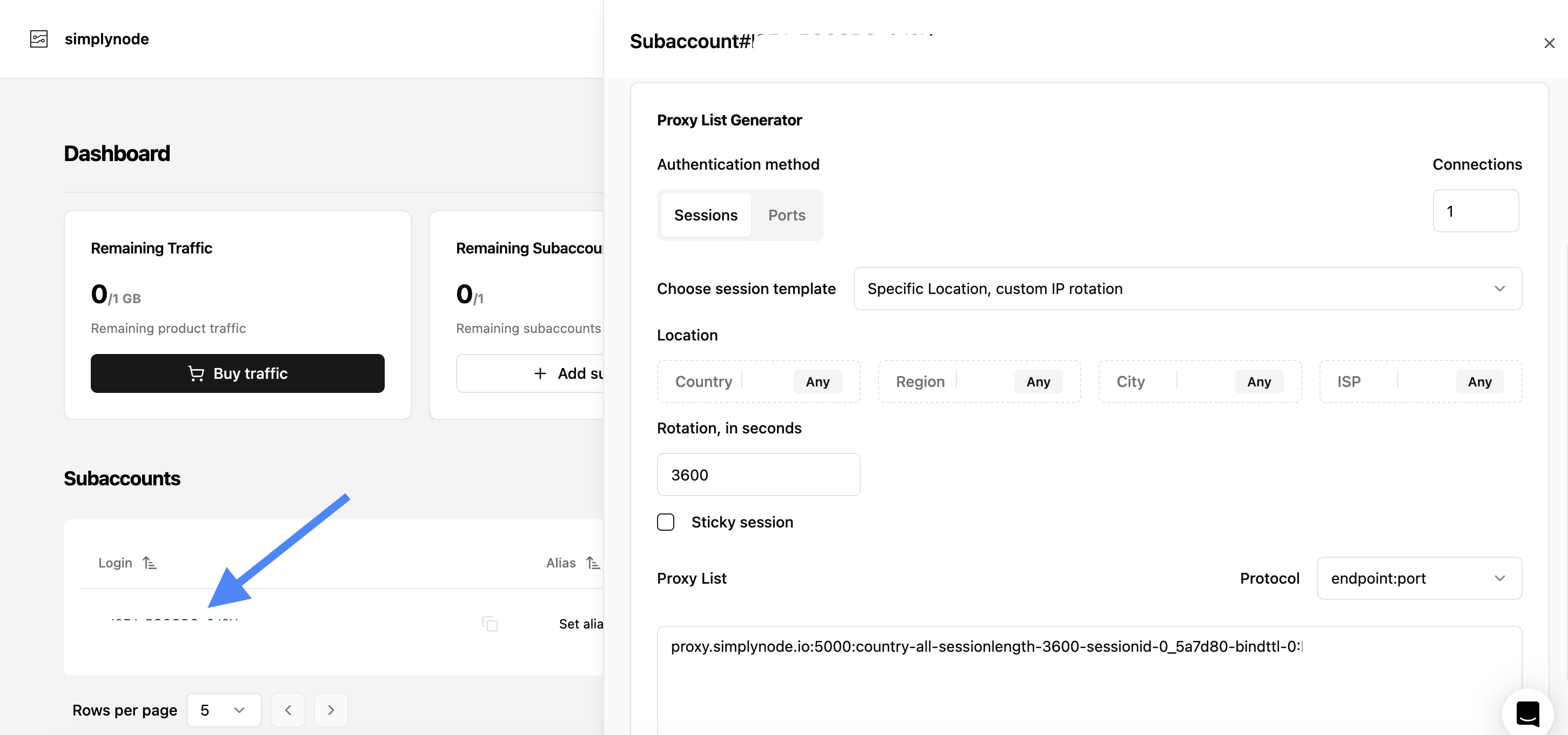
Click on any sub-account name in the Subaccounts list. This opens the settings panel on the right.
At the top, you’ll find the Alias and Login information.
Next is the IP Rotation section. Here you can:
Choose a predefined rotation interval (e.g. 90 seconds, 1 hour, etc.)
Or set a custom duration that fits your specific needs
Scroll further down to the Proxy List Generator:
Select your authentication method (Sessions or Ports)
Pick a session template
Customize your location settings (Country, Region, City, ISP)
Enable Sticky Session if needed
Your personalized proxy string will be instantly generated and ready to copy
This setup gives you full control over how your sub-accounts use proxies, ensuring clean and efficient management whether you’re running automated tasks, managing clients, or segmenting projects.
API Access – Automate Everything
Don’t want to log into the dashboard every time you need something? Good news: now you don’t have to. With our new full-featured API, you can interact with SimplyNode programmatically.
Use it to:
Check balances
Manage proxies
Control sub-accounts and more — all from your own scripts or systems
API access is available by request.
Just drop a message to our support team, and we’ll enable it for your account.
A Fresh Interface – Fast, Clean, Mobile-Ready
We gave the dashboard a full makeover — not just in terms of design, but in speed and usability too.
What’s new:
Lightning-fast navigation
Light and dark themes
Fully responsive layout that works great on mobile devices
Whether you’re a beginner or a power user, the new UI helps you get things done faster, with less clicking and more doing.
Final Thoughts
Dashboard v2.0 is a big leap forward for SimplyNode — made for users who want more flexibility, cleaner management, and real automation power. Whether you’re a solo developer or a growing team, this update is here to scale with you.
Ready to explore?
:format(webp))
:format(webp))
:format(webp))