

.svg)
.svg)




The Challenge of Scraping Google SERPs
Google's search results are, technically, a publicly accessible database containing billions of indexed pages, rankings, featured snippets, and structured data. No login required. No paywall. And yet scraping Google search results at any meaningful scale is genuinely hard.
The legality question comes up constantly, so let's address it: scraping publicly accessible, non-copyrighted search result data is generally treated as a civil — not criminal — matter in most jurisdictions. Google's Terms of Service explicitly prohibit automated access, but a ToS violation is a contractual matter between you and Google, not a criminal offense under statutes like the Computer Fraud and Abuse Act. Google's robots.txt disallows crawling of search result pages — that's a technical instruction, not a legal prohibition, but it's worth understanding the distinction.
The legal landscape is worth understanding precisely. The hiQ Labs v. LinkedIn case is the most relevant CFAA precedent. The Ninth Circuit issued an opinion on April 18, 2022 affirming that scraping publicly accessible data did not violate the CFAA; the Supreme Court then vacated that ruling on June 13, 2022 and remanded in light of Van Buren; the Ninth Circuit affirmed again on January 23, 2023. The Supreme Court denied LinkedIn's cert petition in early 2024. The Ninth Circuit's CFAA ruling — that scraping publicly accessible data does not violate the statute — currently stands, but the case also involved state-law claims that were not fully resolved. Separately, the Supreme Court's Van Buren v. United States (2021) decision narrowed the CFAA by rejecting the government's broad reading of "exceeds authorized access" — the Court held the clause covers those who access computer files or areas they are not permitted to access at all (a "gates-up-or-down" standard), not those who misuse access they legitimately have. Van Buren did not affirmatively declare public data scraping lawful. Note that hiQ v. LinkedIn involved LinkedIn's data, not Google's — Google was not a party to that litigation and may have different legal arguments available. The legal situation remains unsettled. Consult counsel for your specific use case.
What makes Google SERP scraping difficult isn't the law. It's Google's infrastructure. The company has invested heavily in anti-bot systems, and those systems are good. Very good. Google processes billions of searches per day, which means they've seen every scraping pattern imaginable and built defenses against all of them.
Add to that the evolving SERP format. AI Overviews now aggregate answers directly on the results page, knowledge panels pull structured data, and carousels, maps, and shopping results all live in the same HTML. Parsing Google SERPs reliably requires handling a constantly shifting DOM.
This guide covers your real options: dedicated SERP APIs, DIY with headless browsers and proxy rotation, and the cost math behind both.
How Google Blocks Attempts to Scrape Search Results
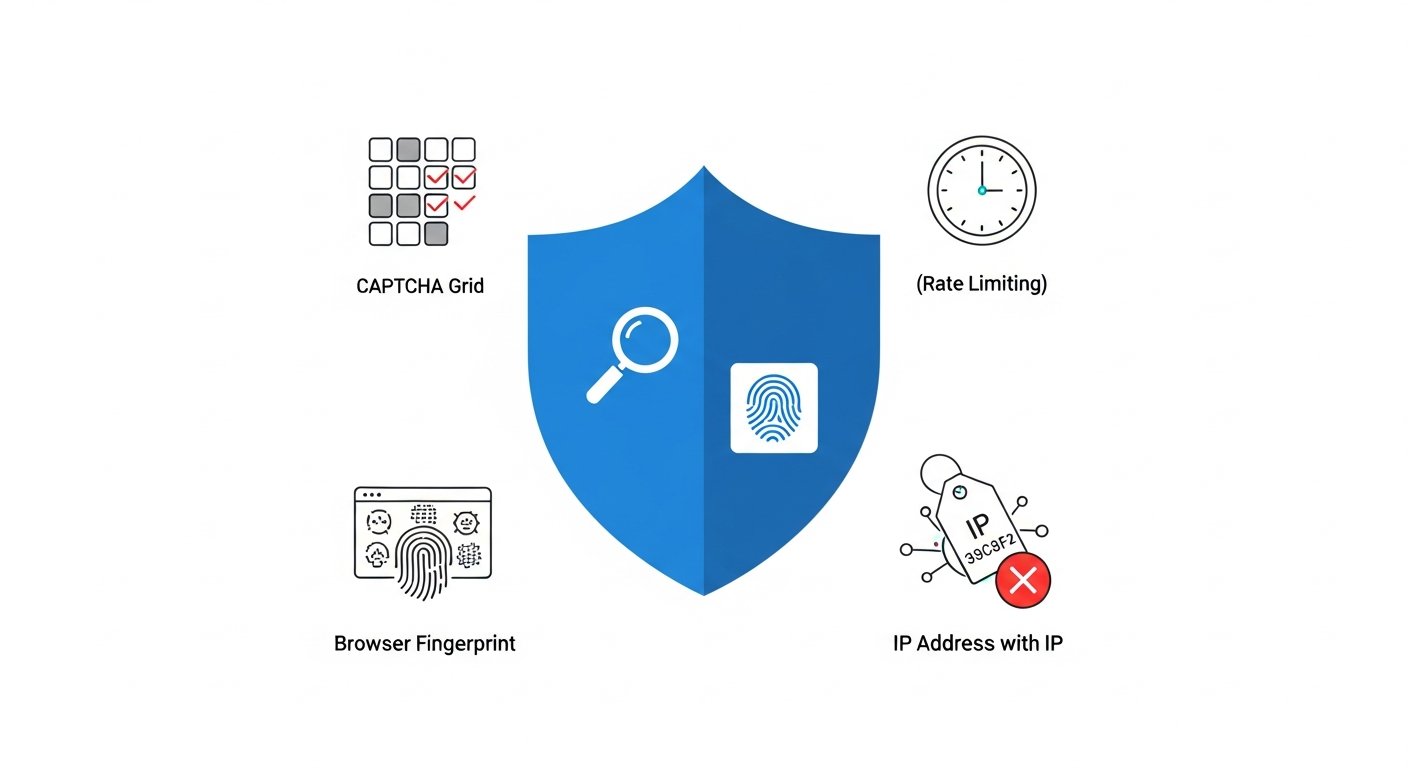
Google blocks scrapers using four primary mechanisms: reCAPTCHA challenges, IP-based rate limiting, IP reputation scoring, and behavioral fingerprinting including TLS signature analysis.
reCAPTCHA is Google's primary anti-bot gate. v2 shows you image grids. According to Google's reCAPTCHA v3 documentation, v3 runs silently in the background and scores user interactions on a 0.0–1.0 scale visible to the site operator, where 1.0 is likely a good interaction and 0.0 is likely a bot. A raw HTTP scraper that bypasses the page entirely won't complete the reCAPTCHA challenge flow at all; a headless browser that does render the page will be scored on its behavioral signals.
Rate limiting kicks in faster than most people expect. Google monitors request frequency per IP, per subnet, and across behavioral patterns. Send more than a handful of searches from the same IP in a short window and you'll start seeing 429 responses, redirect loops to CAPTCHA pages, or results that quietly degrade in quality. The threshold isn't published — it varies by datacenter, time of day, and the apparent trust score of your IP.
IP reputation is its own layer. Google maintains scoring on IP ranges. Datacenter IP blocks are well-known and pre-flagged. If your requests originate from AWS, DigitalOcean, or any major cloud provider's IP space, Google's systems recognize that pattern immediately. Consumer ISP IPs look different. They carry geolocation context and a baseline trust that datacenter IPs simply don't have.
The deeper problem is behavioral fingerprinting. Modern anti-bot systems — including those deployed by services like Cloudflare, Akamai Bot Manager, and PerimeterX/HUMAN — don't just look at your IP. They analyze TLS fingerprints, which vary between real browsers and programmatic HTTP clients. They look at the order of HTTP headers, the presence or absence of certain browser APIs in JavaScript, mouse movement patterns, scroll behavior, and timing. A headless Chromium instance configured out of the box is detectable by several of these signals. A raw requests call in Python is detectable by all of them.
Cookie state matters too. A real user browsing Google has a history of cookies, consent decisions, and session tokens. A fresh scraper has none of that. Google's systems flag the inconsistency.
The net result: you need to approach Google like an adversary that knows your playbook. Because it does.
Method 1: SERP APIs for Scraping Google Search Results
A SERP API accepts a search query via HTTP request and returns structured JSON containing organic results, ads, featured snippets, and SERP features — with proxy rotation, CAPTCHA solving, and HTML parsing handled by the provider.
The simplest path to scraping Google search results is paying someone else to solve the hard parts. That's essentially what a SERP API is.
What SERP APIs Actually Do
A SERP API sits between your code and Google. You send it a search query and parameters (location, language, device type, number of results), and it returns structured data — usually JSON — with the organic results, ads, featured snippets, and whatever else appeared on that SERP. The provider handles proxy rotation, CAPTCHA solving, browser rendering, and HTML parsing on their end.
From your code's perspective, it's just an HTTP request:
import requests

params = {
    'api_key': 'YOUR_API_KEY',
    'q': 'best python web scraping libraries',
    'location': 'United States',
    'num': 10
}

response = requests.get('https://api.serprovider.com/search', params=params)
results = response.json()

for result in results['organic_results']:
    print(result['title'], result['link'])
No proxies to manage. No browser to configure. No CAPTCHA to fight.
The Real Benefits
SERP APIs are worth considering seriously, not just dismissing as expensive shortcuts. The reliability they offer is genuine. Dedicated SERP API providers maintain proxy pools, IP warming infrastructure, and parsing logic specifically tuned for Google. Providers in this space include Bright Data, SerpApi, ScrapFly, and DataForSEO. Their proxy pools are massive, their IP warming strategies are sophisticated, and they absorb the cost of failed requests so you're only billed for successful ones.
Scalability is immediate. Want 10,000 queries per day? You're typically limited only by your plan tier, not by engineering work. Anti-bot handling, parser maintenance when Google updates its DOM, geographic targeting — all of that is their problem.
The Real Limitations
Cost is the obvious one. SERP APIs typically price per successful request. At low volumes that's fine. At 500,000 queries per month, it gets expensive fast, and you're paying that every month with no path to optimization.
One operational reality worth flagging: when Google rolls out a new SERP layout, there is typically a delay before API providers update their parsing logic. During that window, structured output may be incomplete or missing fields. You're dependent on the provider's release cycle.
Vendor lock-inis the subtler problem. Your parsing logic, your data pipeline, your error handling — all of it gets built around one provider's JSON schema. When they change their response format, deprecate an endpoint, or raise prices, you feel it immediately.
You also have limited visibility into what's actually happening. If your success rate drops, you can't inspect the actual browser behavior or proxy selection logic. You're dependent on the provider's support and status page.
For prototyping, low-to-medium volume use cases, or teams without dedicated scraping engineers, SERP APIs are the right call. For high-volume, cost-sensitive, or highly customized scraping, the economics eventually push you toward DIY.
Method 2: DIY Scraping Google Search Results with Proxies and Headless Browsers
Building your own Google scraper gives you full control over every layer: browser behavior, proxy selection, request timing, parsing logic, and error recovery. It's more work. It's also more powerful.
Why Playwright Over Selenium
If you're building a headless browser scraper in 2024, use Playwright. Selenium was the standard for years, but it's showing its age.
Playwright is a framework for web automation and testing that can be used as a library for browser automation scripts including web scraping, PDF generation, and screenshot capture. It supports Chromium, Firefox, and WebKit browsers with a single API, which matters for scraping because you can switch browser engines to vary your fingerprint.
Playwright runs tests in headless mode by default. Multi-browser testing across Chromium, Firefox, and WebKit requires explicit configuration in the playwright.config file — it's not automatic. But that multi-engine support is a genuine advantage when you need to vary your fingerprint across requests.
The developer experience improvements over Selenium are significant. Playwright uses the Locators API for element interaction and automatically waits for elements to be actionable before performing actions — so you don't write explicit time.sleep() calls scattered through your code. Assertions automatically retry until conditions are met, which is exactly the behavior you want when scraping pages with dynamic content.
Playwright can interact with elements by role and name, click elements, focus elements, press keys, and assert element states — the full interaction surface you need to simulate real browsing.
For fingerprint evasion, the playwright-stealth and playwright-extra plugins are commonly used to patch Playwright's detectable signals (canvas fingerprinting, WebGL, navigator properties). Out-of-the-box Playwright is detectable; these plugins address the most obvious tells. Note that the stealth plugin ecosystem has had maintenance gaps — verify compatibility with your current Playwright version before depending on it. Also note that puppeteer-extra-plugin-stealth has a larger community and more active maintenance history than its Playwright port; this is a material consideration if stealth is critical to your use case.
Setting Up Playwright with Proxy Rotation
Here's a working pattern based on Playwright's documented API:
from playwright.sync_api import sync_playwright
from urllib.parse import quote_plus
import random

PROXIES = [
    {'server': 'http://proxy1.provider.com:8080', 'username': 'user', 'password': 'pass'},
    {'server': 'http://proxy2.provider.com:8080', 'username': 'user', 'password': 'pass'},
]

def scrape_serp(query: str) -> list:
    proxy = random.choice(PROXIES)
    encoded_query = quote_plus(query)

    with sync_playwright() as p:
        browser = p.chromium.launch(
            headless=True,
            proxy=proxy
        )
        context = browser.new_context(
            user_agent='Mozilla/5.0 (Windows NT 10.0; Win64; x64) AppleWebKit/537.36 (KHTML, like Gecko) Chrome/124.0.0.0 Safari/537.36',
            viewport={'width': 1366, 'height': 768},
            locale='en-US'
        )
        page = context.new_page()

        try:
            page.goto(f'https://www.google.com/search?q={encoded_query}&hl=en&gl=us')
            page.wait_for_selector('#search', timeout=15000)

            results = page.evaluate('''
                () => {
                    const items = document.querySelectorAll('.g');
                    return Array.from(items).map(item => ({
                        title: item.querySelector('h3')?.innerText,
                        url: item.querySelector('a')?.href,
                        snippet: item.querySelector('.VwiC3b')?.innerText
                    })).filter(r => r.title && r.url);
                }
            ''')
            return results
        finally:
            browser.close()
Note on CSS selectors: .g and .VwiC3b are Google's obfuscated class names and change without notice. Treat these as temporary. The .g selector also captures non-organic result types (ads, knowledge panels), so expect noise. Google also frequently serves different SERP layouts to different users via A/B testing and personalization — a selector verified against the live SERP today may not work for all requests simultaneously. For production use, validate selectors regularly and build in fallback logic.
Note on URL extraction: item.querySelector('a')?.href on Google SERPs typically returns a Google redirect URL (e.g., /url?q=...) rather than the direct destination URL. You'll need to decode or parse these redirect URLs to extract the actual destination.
Also note: this pattern spawns a new browser instance per query, which is resource-intensive at scale. For production, reuse browser instances and rotate proxies at the context level — create new contexts per request, not new browsers. The PROXIES list above uses only two hardcoded entries for illustration; a production pool requires health checking and failure tracking to avoid repeatedly hitting burned proxies.
Each call creates a fresh browser context with its own cookie jar and storage, which Google's systems see as a distinct user. The user_agent and viewport settings should match realistic device profiles. Don't use Playwright's default user agent string — it's detectable.
Browser Contexts and Session Management
Playwright's browser context model is genuinely useful for SERP scraping. Each context is isolated — separate cookies, separate local storage, separate session state. You can run multiple contexts within a single browser instance, which is more efficient than spawning new browsers for every request.
For Google specifically, you want to decide whether to maintain session state or start fresh each time. Fresh contexts avoid cookie-based fingerprinting but may trigger more CAPTCHAs. Warm sessions (where you've done some prior browsing activity) can look more legitimate but require managing state across requests.
Playwright can save authentication state once and reuse it across tests — the same mechanism works for maintaining browsed-state sessions in a scraping context.
When Not to Use a Headless Browser
Headless browsers are resource-intensive. Each Chromium instance consumes real memory and CPU. If you're scraping at high concurrency, the infrastructure cost adds up.
For some scraping targets — static HTML sites, low-protection APIs, targets like Wikipedia or government data portals — curl_cffi (a Python library that mimics browser TLS fingerprints at the HTTP layer) or plain httpx with careful header management is sufficient. But not for Google. Google's JavaScript-heavy SERP rendering and aggressive behavioral analysis mean you genuinely need a full browser for reliable results. Save the lightweight HTTP approach for less protected sites.
Only enable JavaScript rendering when you actually need it. For Google SERPs, you need it. For static HTML pages with no anti-bot, you don't.
Proxy Types for Scraping Google Search Results

For scraping Google search results reliably, residential proxies are required — datacenter proxies are pre-flagged by Google's systems and produce unacceptably low success rates at any meaningful volume.
Your proxy choice has more impact on success rate than almost any other variable. Get this wrong and nothing else matters.
Datacenter Proxies
Datacenter proxies are IP addresses hosted in commercial server infrastructure. They're fast — typically faster than residential alternatives — and cheap, often available for a few dollars per GB or as bulk IP pools.
The problem: Google knows them. Datacenter IP ranges from AWS, Azure, GCP, OVH, and the major hosting providers are well-catalogued. Google's systems flag these ranges aggressively. Success rates on Google with datacenter proxies are low enough that at any meaningful volume, you'll burn significant budget on blocked requests.
Use datacenter proxies for targets that don't employ serious anti-bot measures. For Google? Save your money.
Residential Proxies
Residential proxies route your traffic through real IP addresses assigned by ISPs to actual consumer devices. From Google's perspective, a request from a residential IP looks like a person at home doing a search.
The trust difference is significant. Residential IPs carry implicit legitimacy: a real ISP assignment, a realistic geolocation, and IP history that doesn't scream "cloud server." They help your traffic resemble organic web behavior and bypass IP reputation scoring systems that datacenter proxies consistently fail.
The downsides are real. Residential proxies are slower than datacenter. They're more expensive — pricing varies by provider and changes frequently, so check current pricing pages before budgeting. And since you're routing through real devices, the IPs can be less stable than datacenter alternatives.
For sustained Google SERP scraping at any serious volume, residential proxies aren't optional. They're the baseline requirement. See our comparison of the best residential proxies in 2026 for provider benchmarks.

Provider pool sizes matter for avoiding IP reuse patterns. Oxylabs reports a pool of 100M+ residential IPs (verify against Oxylabs' current product page before budgeting — vendor-reported figures change frequently). Bright Data reports 72M+ residential IPs alongside 770K+ datacenter proxies (verify against Bright Data's current pricing page). These are vendor-reported, unaudited figures; for independent context, proxy market research from sources like ProxyWay's annual reports can provide comparative data. Larger pools mean lower per-IP request frequency, which directly reduces detection risk. Other established providers in this space include Smartproxy and IPRoyal.
ISP Proxies
ISP proxies (sometimes called static residential proxies) are a middle ground. They're residential IP addresses in that they're assigned by ISPs, but they run on hosted server infrastructure rather than consumer devices. The result: residential-level trust with datacenter-level speed and stability.
They're more expensive than datacenter proxies and harder to source than either datacenter or residential. But for use cases where both speed and stealth matter — high-volume Google scraping where latency affects your throughput — they're worth the premium.
Proxy Type Comparison
Note: Success rates on Google vary by proxy quality, request patterns, and query volume. Treat any vendor-published success rate figures as starting points for your own benchmarking, not guarantees.
Disclosure: This article is published by SimplyNode, which offers residential and datacenter proxy services. SimplyNode is one option among many in this market; evaluate providers based on your specific geographic, volume, and budget requirements.
Cost Comparison: SERP API vs. DIY Google Search Results Scraping
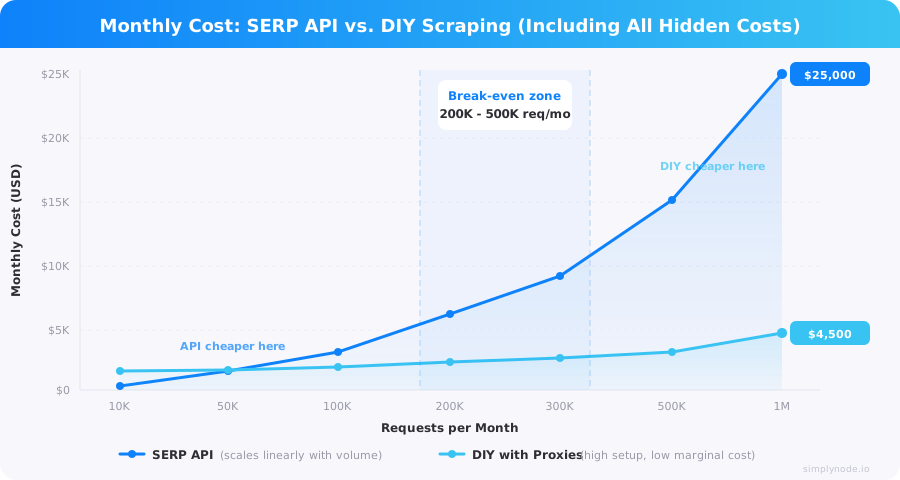
This is where most people make the wrong decision. They see SERP API pricing, compare it to raw proxy costs, and assume DIY is obviously cheaper. It often isn't, at least not initially.
SERP API Pricing
Most SERP APIs price per successful request or per 1,000 queries. Based on publicly available pricing from providers including SerpApi, DataForSEO, and Bright Data, typical entry-level pricing runs $0.001–$0.05 per search. At 10,000 searches per month, that's $10–$500 depending on provider and tier. At 100,000 searches, you're looking at $100–$5,000.
Bright Data reports a pay-as-you-go SERP API starting from approximately $0.001 per record and a 3.1-second average response time (vendor-reported figures — verify against Bright Data's current SERP API pricing page and run your own benchmarks). Bright Data also claims a 100% success rate on Google SERP; treat this as a marketing claim rather than an audited technical metric — no scraping service achieves 100% success across all conditions and query types.
Some providers offer free trial allocations that let you validate your pipeline before spending anything — check each provider's current signup page for available trials.
The per-request cost is just the visible line item. SERP APIs also bundle in:
- Parsing and structured output (you don't pay engineers to maintain CSS selectors)
- Anti-bot infrastructure
- Geographic targeting
- Retry logic on failed requests
DIY Proxy-Based Costs
The proxy cost itself is the easy part to calculate. A typical Google search result page — when fully rendered by a headless browser including JavaScript, CSS, and associated resources — loads roughly 1–3MB of data (variable depending on SERP features active; feature-rich SERPs with AI Overviews can exceed this range). That's the realistic figure for Playwright-based scraping; lightweight HTML-only estimates significantly understate actual bandwidth consumption.
At 100,000 searches per month: roughly 100–300GB of bandwidth depending on rendering configuration. Compare that bandwidth cost to SERP API pricing at the same volume, and the raw numbers look less compelling than a simple per-page estimate suggests. But here's what the proxy-only calculation ignores:
Development cost.Building a reliable Google scraper takes time. Setting up Playwright, writing the parsing logic, handling Google's frequent DOM changes, implementing retry logic, managing proxy rotation — that's weeks of engineering work, not hours. At typical contractor rates (e.g., $75–$150/hour depending on market), even 40 hours of initial development represents $3,000–$6,000 before you've scraped a single result.
Maintenance cost.Google updates its SERP layout regularly. Your CSS selectors will break. Your detection evasion will degrade as Google updates its systems. Plan for ongoing engineering time — conservatively 4–8 hours per month just keeping things working.
Infrastructure cost.You need servers to run your Playwright instances. High-concurrency scraping requires meaningful compute. A dedicated server or cloud instance capable of running 10–20 concurrent browser sessions costs $50–200/month.
Failed request cost.Even with residential proxies, some requests will fail. If your success rate is 90%, you're paying proxy bandwidth for 10% of requests that return nothing useful. Factor that into your effective per-result cost.
The Realistic Cost Comparison
Note: The DIY figures below are illustrative estimates derived from the cost assumptions stated in this section (contractor rates, proxy bandwidth, infrastructure, maintenance). They are not externally benchmarked figures. Your actual costs will vary based on your engineering rates, proxy provider, and query mix.
Based on the cost structure above, the break-even point between SERP APIs and DIY typically falls between 200,000–500,000 requests per month, assuming you have the engineering capacity to build and maintain the system. Below that threshold, SERP APIs are often cheaper when you account for the full cost picture. Above it, the economics flip.
One more thing that rarely gets mentioned: at very high volumes, some SERP API providers require enterprise agreements, SLA negotiations, and sometimes manual setup for Google specifically. That friction has its own cost.
Advanced Strategies for Robust Google Scraping
Running a scraper that works in testing and running one that sustains itself over weeks at production volume are very different problems.
Request Timing and Retry Logic
Random delays between requests are table stakes. The goal isn't just adding delays — it's making your request timing look organic. Real users don't search at exactly 2-second intervals. Add jitter. Vary your delays based on pseudo-realistic session behavior: faster within a "session," longer between sessions.
Playwright's retry configuration is worth using deliberately. You can set retries to 2 for any given test or request block, configure a timeout of zero for cases where you want indefinite waiting, or set a 60-second timeout for a group of operations. For scraping, configurable timeouts per operation let you handle slow-loading SERPs without killing your entire worker on a single slow request. Playwright's default action timeout is 30,000ms (30 seconds) — see Playwright's timeout documentation for the full timeout hierarchy. Note that page.goto() uses a separate navigationTimeout (also defaulting to 30,000ms) configured differently from action timeouts — if you only override wait_for_selector timeout as in the code example above, slow-loading SERPs can still hit the navigation timeout unexpectedly.
User-Agent and Header Management
Never use a single user-agent string. Rotate across a list of realistic, current browser UA strings that match your actual browser engine (don't send a Chrome UA from a Firefox browser instance). Keep the list updated — outdated UA strings are themselves a detection signal. For best results, rotate user agents at the browser context level rather than the browser level, since each context represents a distinct session.
Beyond user-agent, keep your full request header set realistic. Accept-Language, Accept-Encoding, the sec-ch-ua headers that Chrome sends — they should all look like a real browser. Most headless browsers get this mostly right by default, but verify with a tool like httpbin.org that your headers match what a real browser would send.
Variable Passing and Script Architecture
In Playwright's evaluation methods, pass variables explicitly as arguments rather than closing over them. Evaluation methods take a single optional argument — use it. Variables from your test environment aren't automatically available in the page context, and implicit scoping leads to subtle bugs that are painful to debug at 3am when your scraper breaks.
CAPTCHA Handling
Third-party CAPTCHA solving services such as 2captcha and Anti-Captcha provide human or AI-based solving via API. 2captcha's current pricing starts at approximately $0.50–$2.99 per 1,000 solved CAPTCHAs depending on CAPTCHA type, with latency of 5–30 seconds per solve (verify against 2captcha's current pricing page before budgeting). Be aware that the terms of use for these services generally prohibit bypassing security on third-party sites — a compliance consideration for your use case.
ReCAPTCHA bypass is a deep topic. The honest summary: if you're hitting CAPTCHAs regularly, your proxy quality or request patterns are the root cause, not a solvable CAPTCHA problem. Fix those first. For v3 reCAPTCHA specifically, the token-based scoring approach means you can't "solve" it in the traditional sense — your best defense is behavioral legitimacy upstream.
Error Handling and Observability
Log everything. Every failed request, every CAPTCHA encounter, every timeout. Aggregate these metrics so you can see patterns: is one proxy getting burned? Is a specific query type triggering more blocks? Are failures correlated with time of day?
Playwright shows the error pointing to the exact action that failed when something inside a step fails, which gives you the granularity you need for debugging. Build structured logging around this. A scraper without observability is just a black box that occasionally stops working.
Which Method to Use for Scraping Google Search Results
There's no universal answer. Here's how to think about it.
Use a SERP API if:you need results quickly, your volume is under 200K requests/month, you don't have dedicated scraping engineering capacity, or this is a project where reliability matters more than cost optimization. The all-in cost of a SERP API is often lower than people expect once you price in development and maintenance.
Build DIY if:you're above the 500K/month threshold and have the engineering to maintain it, you need custom parsing or data enrichment that APIs don't support, you require fine-grained control over request behavior and proxy selection, or you have specific geographic or behavioral requirements that off-the-shelf APIs can't meet.
The hybrid approachhas worked well for teams validating a new use case: use a SERP API to validate your data pipeline, then migrate high-volume query types to a DIY stack once volume justifies it, while keeping the SERP API for edge cases or specialized result types.
Residential proxies are non-negotiable for the DIY path. Datacenter proxies don't cut it on Google at any meaningful scale. Factor the residential proxy cost into your build-vs-buy calculation from day one, not as an afterthought.
Start simple. Google's anti-bot measures are sophisticated, but they're not impenetrable with the right tools. Build incrementally, measure your success rates obsessively, and add complexity only where the data tells you to.
Actionable Takeaways
- Don't start with datacenter proxies on Google. You'll burn budget on blocked requests and waste time debugging what is ultimately a proxy-type problem.
- Match your approach to your volume. Under 200K/month, SERP APIs usually win on total cost. Over 500K/month, DIY usually wins.
- Playwright is the right headless browser choice today. The auto-waiting, browser context isolation, and multi-engine support are genuine advantages for scraping.
- Google's CSS class names change constantly — hardcoded selectors like
.gand.VwiC3bwill break. Build selector validation into your pipeline. - Build observability from day one. A scraper without metrics is a scraper you can't improve.
- These proxy and evasion principles apply broadly — see our guides on scraping Amazon and scraping LinkedIn for platform-specific tactics.
- When CAPTCHAs appear regularly, the fix is better proxies and more realistic behavior patterns — not better CAPTCHA solving.
- The DIY approach costs more upfront than people estimate. Budget for ongoing maintenance, not just initial build.
- If you're evaluating proxy providers, SimplyNode offers residential and datacenter options worth including in your comparison — we're the publisher of this article, so factor that appropriately.
Frequently Asked Questions
Is it legal to scrape Google search results?
Scraping publicly accessible Google search results is a legally unsettled area. Google's Terms of Service prohibit automated access, which is a contractual violation but not a criminal offense under the CFAA based on current Ninth Circuit precedent (hiQ Labs v. LinkedIn, affirmed January 2023). The legal situation varies by jurisdiction and use case — consult counsel before proceeding at scale.
What is the best proxy type for scraping Google SERPs?
Residential proxies are the minimum viable proxy type for reliable Google SERP scraping. Datacenter proxies are pre-flagged by Google's IP reputation systems and produce low success rates at any meaningful volume. ISP proxies (static residential) offer residential-level trust with datacenter-level speed and are worth the premium for high-volume use cases.
How much does it cost to scrape Google search results at scale?
SERP APIs typically cost $0.001–$0.05 per query with no setup cost. DIY scraping with Playwright and residential proxies requires $3,000–$6,000 in initial engineering plus $400–$800/month in maintenance and $50–$200/month in infrastructure. Based on these cost structures, the break-even between the two approaches falls around 200,000–500,000 requests per month.
Why do datacenter proxies fail on Google but residential proxies work?
Google maintains IP reputation scoring that pre-flags datacenter IP ranges from providers like AWS, Azure, and GCP. Residential IPs carry ISP assignments, realistic geolocation context, and usage history that makes them look like real users. Datacenter IPs have none of that context, so Google's systems block or heavily restrict them regardless of request behavior.
When should I use a SERP API instead of building my own Google scraper?
Use a SERP API when your volume is under 200,000 requests/month, you don't have dedicated scraping engineering capacity, or time-to-first-result matters more than long-term cost optimization. Above 500,000 requests/month with engineering resources available, DIY typically becomes cheaper when accounting for the full SERP API cost at that scale.
%20-%202026-05-21T164357.956.png)
%20-%202026-05-21T162719.912.png)
%20-%202026-05-19T120136.626.png)
%20-%202026-05-18T110557.344.png)
%20-%202026-05-15T113858.229.png)
%20-%202026-05-14T121851.922.png)
%20-%202026-05-13T120005.619.png)
%20-%202026-05-12T112504.017.png)
%20-%202026-05-11T112454.822.png)
%20-%202026-05-07T105244.165.png)
%20-%202026-05-05T121326.455.png)
%20-%202026-04-30T132926.682.png)
%20-%202026-04-29T122656.668.png)
%20-%202026-04-28T165006.557.png)
%20-%202026-04-27T151422.596.png)
%20-%202026-04-24T134808.219.png)
%20-%202026-04-23T131230.882.png)
%20-%202026-04-22T111352.506.png)
%20-%202026-04-21T115725.855.png)
%20-%202026-04-20T131158.661.png)
%20-%202026-04-10T112244.119.png)
%20-%202026-04-09T111424.150.png)
%20-%202026-04-08T130405.235.png)
%20-%202026-04-07T113530.055.png)
%20-%202026-04-06T113015.908.png)
%20-%202026-04-02T120940.360.png)
%20-%202026-04-01T144424.516.png)
%20-%202026-03-30T112807.229.png)
%20-%202026-03-26T160000.403.png)
%20-%202026-03-26T113412.170.png)
%20-%202026-03-25T110333.022.png)
%20-%202026-03-23T125824.589.png)
%20-%202026-03-19T135903.501.png)
%20-%202026-03-19T114712.472.png)
%20-%202026-03-18T142314.362.png)
%20-%202026-03-17T135837.094.png)
%20-%202026-03-16T113750.118.png)
%20-%202026-03-13T134616.799.png)
%20-%202026-03-11T133856.227.png)
%20-%202026-03-10T124412.864.png)
%20(100).png)
%20(99).png)
%20(98).png)
%20(97).png)
%20(96).png)
%20(95).png)
%20(94).png)
%20(93).png)
%20(92).png)
%20(91).png)
%20(90).png)
%20(90).png)
%20(89).png)
%20(88).png)
%20(87).png)
%20(86).png)
%20(85).png)
%20(84).png)
%20(83).png)
%20(82).png)
%20(81).png)
%20(80).png)
%20(79).png)
%20(78).png)
%20(77).png)
%20(76).png)
%20(75).png)
%20(74).png)
%20(73).png)
.png)
.png)
.png)
.png)
.png)
%20(72).png)
%20(70).png)
%20(68).png)
%20(66).png)
%20(64).png)
%20(63).png)
%20(62).png)
%20(60).png)
%20(59).png)
%20(58).png)
%20(57).png)
%20(52).png)
%20(51).png)
%20(49).png)
%20(48).png)
%20(46).png)
%20(45).png)
%20(44).png)
%20(43).png)
%20(42).png)
%20(41).png)
%20(40).png)
%20(37).png)
%20(36).png)
%20(35).png)
